10.1. Preparing to Calculate your own parameters
This will take: ~ XX minutes (note there are 5 topics)
Prior to this activity
Basics for running SuPy
Activity
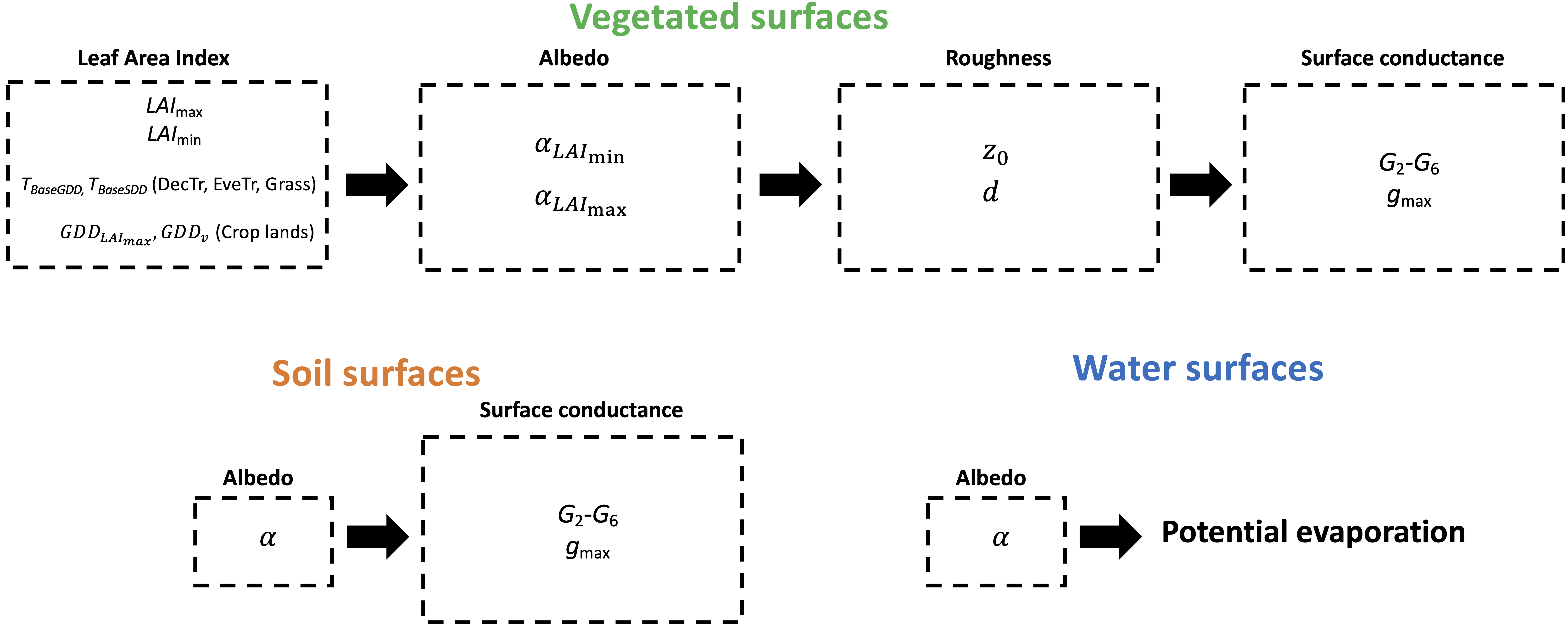
In these tutorials you can calculate various SUEWS parameters before running the model for the specific site and vegetation type. The parameters discussed here are:
LAI
albedo
surface roughness length and displacement height
surface conductances.
The Figures below shows the order in which parameters should be derived:
These tutorials are based on the calculations undertaken in Omidvar et al. (2020).
In this example we use meteorological observations from AmeriFlux (https://ameriflux.lbl.gov/) network. The data required are air temperature, incoming shortwave radiation, upwelling shortwave radiation, station pressure, relative humidity, wind speed, precipitation, net all-wave radiation, sensible heat flux and latent heat flux, ideally storage heat flux (os soil heat flux if a simple surface), and the momentum flux. Wind direction is also very helpful.
Reference
Omidvar H, T Sun, S Grimmond, D Bilesbach, A Black, J Chen, Z Duan, Z Gao, H Iwata, JP McFadden. Surface [Urban] Energy and Water Balance Scheme in non-urban areas: developments, parameters and performance, (in review)
10.1.1. Steps to using these notebooks:
Terms in the notebooks are defined here
1- Download the following files and codes (all the files are available here. You need to unzip the folders):
data : data that are necessary to calculate parameters (put them in the same directory as notebooks).
Utility functions: these are the utility functions that are called in notebooks. Put them in the same directory as notebooks.
CSV files containing site information and parameters. Put them in the same directory as the notebook:
site parameters . You can then change these parameters if you like to tune the sites.
runs folder contains SUEWS files which are used by SuPy
figs folder to write the figure into (it can be empty initially). Put them in the same directory as the notebook.
outputs folder to write down pickle files. The structure of the file should be as it is in the link, but the folders (LAI, albedo etc.) can be empty initially. Put them in the same directory as notebook.
Note: after downloading the above files an folders, the structure of the directory where you are running the notebooks should be as same as here.
2- Download this environment file. Go to the directory where the file is. Type
conda env create -f environment.yml
After all the packages are installed, type
conda activate SUEWS_parameters
This activates the the created environment. In the same environment, open Jupyter notebook.
3- Then you can run each notebook in the same order as the tutorials taht follow. `
Tip
Please report workshop manual issues at GitHub Issues. Go from the page with the problem - an automatical link will be inserted. Thanks.